
How it works

Your campus knowledge.
Clearer directions.

The best directions often live in the heads of the people who work there. Hospital Directions turns that knowledge into something every visitor can use.

01

Understand the arrival.

Identify the entrances, parking areas, departments, elevator banks, check-in points, and connections that matter for your campus.

Every implementation includes an on-site mapping visit. We walk the real environment, review available floor plans, note the signs and landmarks visitors actually see, and capture the questions your front-line teams hear most.
02

Build the instructions.

Organize the campus into starting points, route segments, and destinations. Write practical instructions around signs and recognizable landmarks.

Add everyday search terms, department-specific check-in instructions, and helpful arrival details. Riverview demonstrates these alongside its directory, language switching, and available maps.

03

Walk it. Check it.

Walk the proposed routes on site and verify door access, elevator connections, check-in instructions, landmarks, and any special requirements in the real environment.

Then review the completed directions with the hospital team before publishing. We verify routes more than once because software can confirm that a path exists; the on-site visit confirms what a visitor will actually encounter.

04

Put it where people need it.

Location-specific QR signs and links open directions in a browser. A visitor can also choose a starting point manually.

Agree on who reports changes and how updates are reviewed before launch. Construction, relocated departments, and restricted doors all need an update process.

In the visitor’s hands

Scan and go.

No app account needed to get directions.

A location-specific QR sign supplies the starting point—not a continuous location feed. The visitor chooses a destination and follows the route in the browser.

Experience a sample route (opens demo in a new tab)
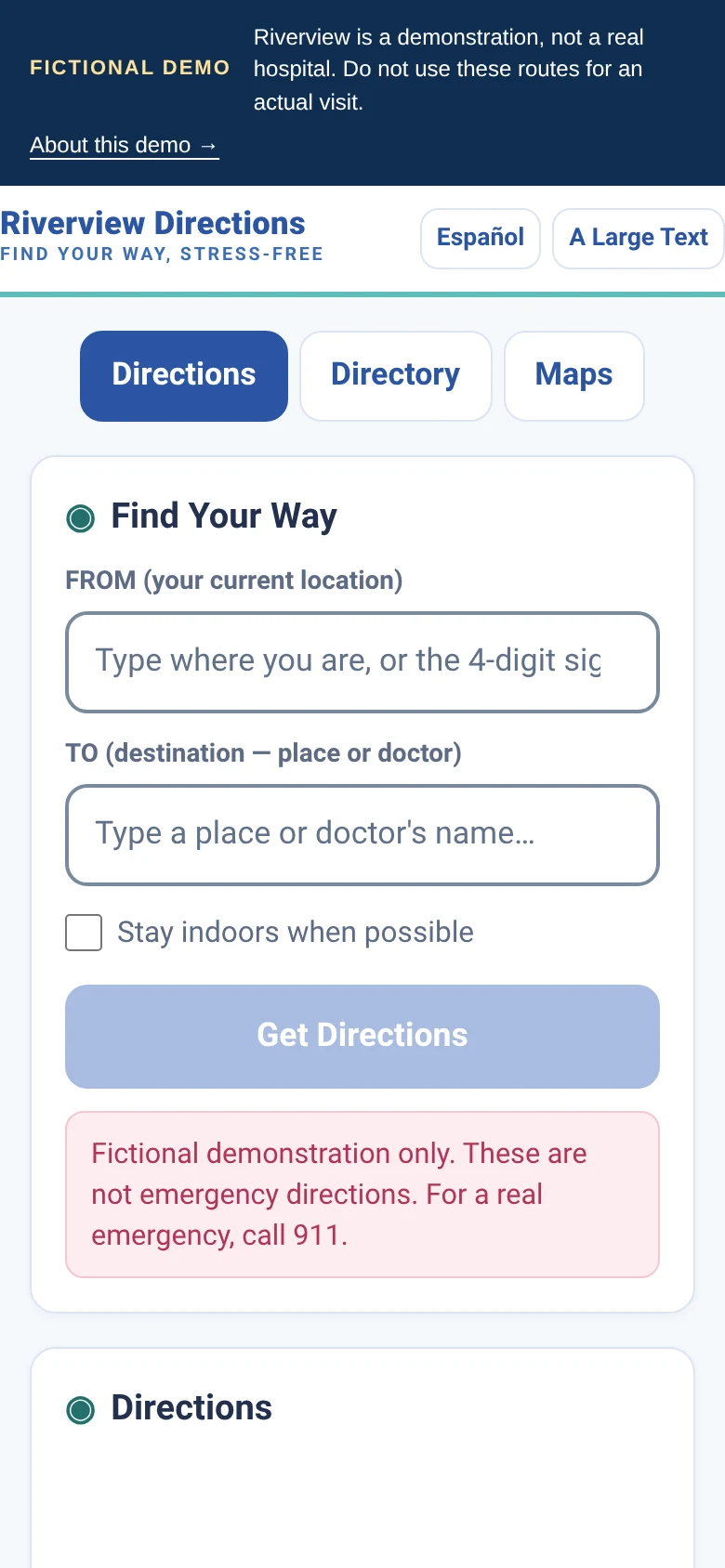
Actual Riverview start and destination form
Actual Riverview screen · Fictional demo
What if they still get lost? That’s the advantage of having QR signs throughout the hospital. Scan the nearest sign to re-establish the starting point and continue from there.

Search the words people use

Dad-proof directions.
Hospital-ready detail.

You shouldn’t need a medical dictionary to find the right desk.

Hospital Directions pairs official department names with familiar search terms. A visitor can type the words they know, review the matching destination, and choose where to go.

Your team defines these terms. Search helps find a named location; it does not decide which medical service someone needs. Similar or ambiguous names need review before launch.

Working examples in Riverview

“Blood draw”Lab (Outpatient)North Tower · Level 1
“Brain doctor”NeurologyMedical Office Building · Level 2

Try either phrase in the demo’s TO field. The result shows the actual department name and location before you select it.

Try plain-language search (opens demo in a new tab)

The visit has a sequence

“Go to the lab”
may skip a step.

Include the check-in instructions that a map alone can’t explain.

Configure instructions for the correct registration desk, where to get a wristband, or a department’s check-in location. Those details are reviewed with the hospital, not guessed by the app.

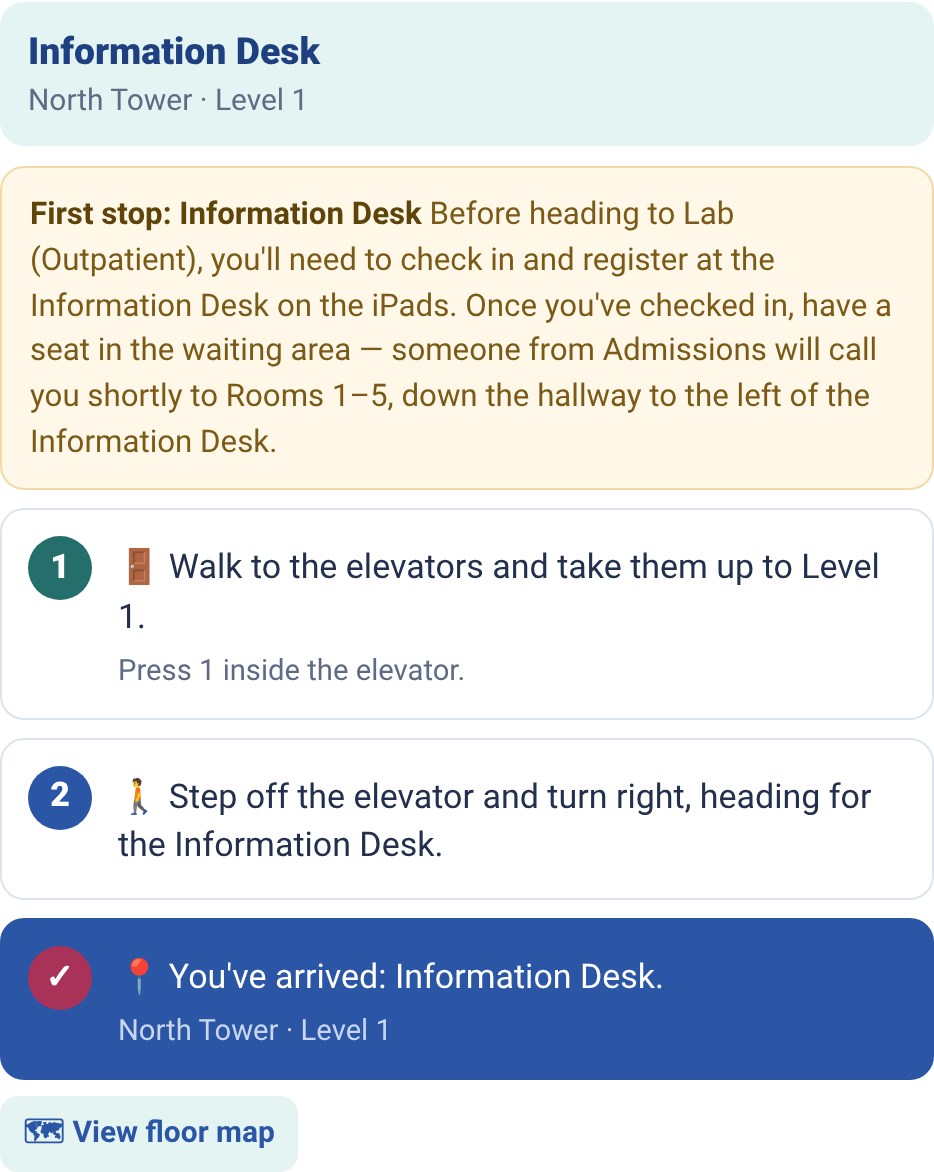
Riverview’s lab example asks whether the visitor already has a wristband. “Not yet” shows instructions and a route to the Information Desk first; “Yes” shows the route to the lab.

This is a fictional workflow example, not a rule for every lab visit. The app provides directions; it does not complete registration, confirm eligibility, or issue a wristband.

Try both answers in the demo (opens demo in a new tab)
Actual Riverview demoAfter “Not yet”
Riverview directions to the Information Desk, showing registration instructions before a lab visit
Destination-specific instructions and the next place to go.

Adaptable as your hospital changes

A moved desk shouldn’t
mean a new app.

Update the details that changed—not the entire wayfinding system.

01

Tell us what changed.

A check-in desk moves. A department gets a new name. A hallway closes. Your hospital contact identifies the change.

02

Adjust the right details.

Update the affected destination, search terms, instructions, or route connections. Your team verifies the new campus information.

03

Review and publish.

Release the revised web directions after review. No app-store update is needed for visitors to use the new version.

Update allowances, review responsibilities, turnaround, and major remapping are defined in your service agreement. Your team approves hospital-specific changes before the revised instructions are published.

See scope and planning estimates

Keep the scope clear

What this is.
And what it isn’t.

A browser-based wayfinder.

It uses curated paths, known locations, plain-language steps, and available maps.

Not a real-time positioning system.

The core demo does not use beacon tracking, a live location dot, or automatic turn detection.

Not an emergency navigation service.

Real hospital emergency and safety procedures always take priority. The public Riverview app is a fictional demonstration, not directions for a real visit.

A defined implementation.

Hospital branding, map permissions, hosting requirements, rollout, training, and maintenance responsibilities are scoped with the hospital—not assumed.

A family talking with staff at a hospital reception counter

A clearer way forward

Let’s walk through
your hospital.

Tell us about your campus and the visitor journey. We’ll show you how Hospital Directions could help.

Schedule a demo today Reach out to learn more. No patient information needed.